
Most AI agent failures in production trace back to context engineering, and rewriting the prompt rarely fixes them.
A procurement team runs an agent that onboards new suppliers. Each run takes about forty steps: read the application, check sanctions lists, pull the supplier policy, verify bank details, score risk, and route for approval. In testing, it was flawless. In week three of production, it approved a supplier whose contract value was above the threshold that requires a second signature.
The team spent four days rewriting the system prompt. They made the threshold rule louder, moved it to the top, and added examples. Nothing changed. The trace told a different story. The agent had retrieved the correct policy at step six. By step thirty-one, that policy sat under tens of thousands of tokens of raw sanctions-check output and bank API responses. The agent’s memory also held a threshold from an older policy version, written during a test run months earlier. And two tools, one for current policies and one for archived ones, had nearly identical descriptions, so the agent queried the wrong one on a retry.
The prompt was fine. The context was not. The fix took two days: cap and summarize tool outputs, scope policy retrieval to the version in force today, expire memory entries tied to superseded policies, and rewrite the two tool descriptions so they could not be confused. This guide explains the discipline behind that fix: what context engineering is, the six ways agents fail on context, the techniques that prevent them, and how to manage the context window, agent memory, and enterprise data sources over long tasks.
What Is Context Engineering?
Context engineering is the practice of deciding what information an AI model sees at each step of a task, in what form, and in what order, so it has exactly what it needs to act correctly and little else. Context engineering for AI agents covers everything that enters the context window across a run: instructions, tool definitions, retrieved documents, memory, conversation history, and the results of every tool call.
A model can only reason over what is in its context window when it responds. The system must place everything an agent knows about your business, your user, your policies, and its own progress on a task there. Context engineering is the design of that system.
In a typical agent, six sources compete for the same limited space:
- Instructions. The system prompt: role, rules, constraints, and output expectations.
- Tool definitions. The name, description, and parameters of every tool the agent can call.
- Retrieved knowledge. Documents, records, and data pulled in for the current task.
- Memory. Facts and preferences carried over from earlier sessions or earlier in the same run.
- History. The conversation and the agent’s own previous reasoning and actions.
- Tool results. The output of every search, query, and API call the agent makes.
On the first step, instructions and tool definitions dominate. By step thirty of a long task, tool results and history usually take up most of the window. That shift is why agents that perform well in short demos fail in long production runs.
Context Engineering vs Prompt Engineering: What Is the Difference?
Prompt engineering is writing the instructions a model receives. Context engineering is designing the whole system that assembles everything the model receives, including those instructions, and keeps it accurate as a task unfolds. A prompt is written once and changed occasionally; context is rebuilt on every step of every run.
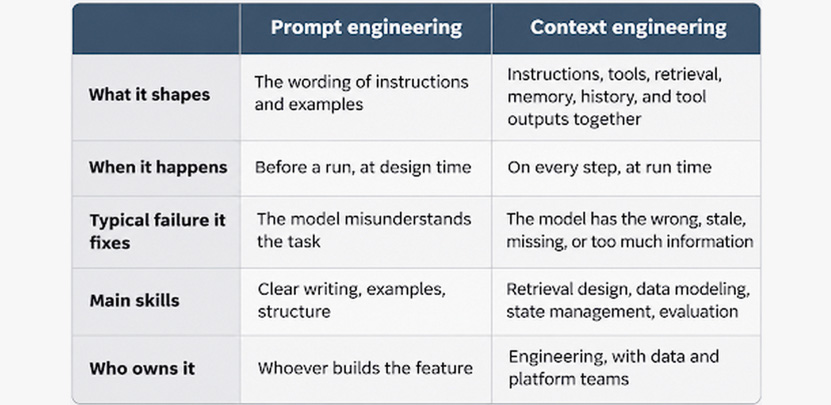
Prompt engineering still matters; a confusing instruction will hurt any agent. But in any context-engineering vs. prompt-engineering comparison, the gap is widest in multi-step agents, where prompt changes hit a ceiling quickly. When an agent fails on step thirty, the instruction it read on step one is rarely the cause, and rewriting it, as the procurement team learned, rarely helps.
Why Do AI Agents Fail on Context? Six Failure Modes
Agents fail on context in six recognizable ways: missing information, too much information, poisoned information, conflicting information, stale memory, and confusing tools. Each has a distinct symptom in the trace, which makes diagnosis faster than guessing at prompt changes.
1. Context starvation
Symptom: the agent guesses, asks questions it should be able to answer, or invents plausible details.
Cause: it never retrieved the information it needed, or it retrieved it for a different query.
First fix: check what retrieval actually returned for that step before changing anything else.
2. Context flooding
Symptom: the agent ignores an instruction or fact that is technically present, usually late in a long run.
Cause: the relevant content is buried among large tool outputs, full documents, or long history. Model attention degrades as context grows, a pattern often called context rot.
First fix: cap and summarize tool outputs, and retrieve passages instead of whole documents.
3. Context poisoning
Symptom: the agent repeats an error with growing confidence, or follows instructions nobody gave it.
Cause: a wrong fact entered context, from a bad retrieval, its own earlier mistake, or text hidden in a document, and every later step built on it. Instructions planted in retrieved content are prompt injection, one of the risks an AI risk management program has to test for before an agent goes live.
First fix: treat retrieved content as data, never as instructions, and validate facts before writing them to memory.
4. Context conflict
Symptom: the agent’s answers flip between runs, or it blends two incompatible rules.
Cause: context holds two versions of the same thing, such as an old and a new policy, or two systems that define “customer” differently.
First fix: filter retrieval by effective date and source of truth, so only one version can enter.
5. Stale memory
Symptom: the agent applies a preference, rule, or fact that used to be true.
Cause: memory entries have no expiry and no link to the source they came from.
First fix: attach a source and a validity window to every memory entry, and expire entries when their source changes.
6. Tool confusion
Symptom: the agent calls the wrong tool, passes the wrong parameters, or loops between tools.
Cause: too many tools, overlapping descriptions, or parameter names that mean different things in different tools. Every connected tool also adds its definition to the window on every step, which is a cost teams adding servers through the Model Context Protocol often underestimate.
First fix: reduce the tool set per task and rewrite descriptions so each tool’s purpose and limits are unmistakable.
The procurement agent in the opening hit four of these at once: flooding, conflict, stale memory, and tool confusion. Rewriting the prompt addressed none of them.
What Are the Core Context Engineering Techniques?
The core context engineering techniques are selecting, compressing, isolating, persisting, structuring, and designing tools well. Each one targets one or more of the failure modes above, and most production agents need all six.
Select: retrieve only what the step needs. Retrieve at the moment of need instead of loading everything up front, and retrieve passages instead of whole documents. Filter by metadata before ranking by similarity: effective date, source system, business unit, and the requesting user’s access rights. Retrieval quality depends heavily on how source documents are prepared; splitting them along natural boundaries and tagging each piece with source and date is the same data-transformation discipline analytics pipelines apply to tables.
Compress: keep the meaning, drop the bulk. Summarize tool outputs before they enter history, keeping identifiers, numbers, and decisions while dropping raw payloads. When history grows long, replace older turns with a running summary of what has been decided and what remains. Keep the full raw output in storage the agent can re-read if it needs a detail later.
Isolate: give sub-tasks their own context. Hand self-contained work, such as researching one supplier’s ownership structure, to a sub-agent with a clean context window. The sub-agent returns a short result instead of its whole working history. The main agent’s context stays focused on coordination.
Persist: write state outside the window. Long tasks need a scratchpad or task file the agent updates as it goes: the goal, steps completed, open questions, and decisions made. After compaction or a restart, the agent re-reads that file instead of reconstructing progress from fragments.
Structure: make context easy to read. Label each section of context by type and source, put stable instructions first and changing content later, and restate the current goal near the end of long contexts. Clear structure lowers the chance that a tool result is mistaken for an instruction.
Design tools for the model that reads them. Give each tool one clear job, a description that says when to use it and when not to, and outputs sized for a model to read. Load only the tools a task needs. A tool that returns a short, relevant answer does more for context quality than any amount of downstream summarization.
Teams practicing AI-native engineering apply the same thinking to coding agents, treating shared context files as versioned infrastructure that every agent loads. The techniques here extend that discipline to agents that run business processes.
How Should You Manage the Context Window on a Long Task?
Manage the context window like a budget: reserve fixed space for instructions and tools, cap how much each tool result can consume, compact history before the window fills, and keep headroom for the model’s own reasoning and output. A larger context window raises the ceiling, but it does not remove the need to manage what goes into it, because attention to any one detail weakens as the total grows.
Think of the window in three layers:
- The fixed layer holds the system prompt and tool definitions. It loads on every step, so you pay for every word on every step. Keep it short, and load task-specific rules only when the task calls for them.
- The task layer holds the goal, the plan, and the retrieved knowledge for the current step. It should change as the task moves forward, removing or summarizing knowledge from finished steps.
- The working layer holds recent history and tool results. It grows fastest and needs the most active management.
Five rules keep long runs stable:
- Set a per-result cap. No single tool result should take more than a fixed share of the window. Summarize larger results, and save the full version to storage the agent can query.
- Compact on a trigger, not on failure. When the window reaches a set fill level, replace older history with a summary that preserves decisions, open questions, identifiers, and the current plan.
- Clear finished tool results. Once a result has been used and its outcome recorded, the raw output rarely needs to stay.
- Restate the goal. After compaction, put the original goal and constraints back near the end of the context, where models attend most reliably.
- Keep headroom. Leave room for the model to reason and respond. An agent squeezed to the edge of its window produces truncated or rushed outputs.
Every token loaded also costs money. Tracking tokens per completed task, per step, and per tool is part of the AgentOps discipline of running agents in production, and it often shows that one verbose tool accounts for most of the spend.
How Does Agent Memory Work, and How Do You Keep It Accurate?
Agent memory is information stored outside the context window and brought back into it when relevant, so an agent can carry facts, preferences, and lessons across steps and sessions. Memory solves context starvation across sessions, but it is also a frequent source of stale and poisoned context, so it needs rules for what gets written, how it is retrieved, and when it expires.
Four kinds of memory show up in production agents:
- Working memory is the task file or scratchpad for the current run: goal, plan, progress, and open questions. It is discarded or archived when the task ends.
- Episodic memory records what happened in past runs: which supplier was escalated and why, which approach failed last time. It helps the agent avoid repeating mistakes.
- Semantic memory holds facts about the user, the customer, or the business: a customer’s preferred contact channel, a team’s approval limits.
- Procedural memory holds learned ways of doing things: the steps that work for a recurring task, or corrections a reviewer made that should apply next time.
Three rules keep memory from turning into a liability:
Write deliberately. Not every observation deserves to be remembered. Write facts that will matter later, validated against a source of truth where one exists, and never write content that came from an untrusted document without checking it.
Attach provenance and expiry. Every entry should record where it came from, when, and how long it stays valid. When a source changes, such as a new policy version, entries derived from the old one expire. This single rule would have prevented the stale threshold in the opening scenario.
Scope by identity. Memory written while serving one user or one customer must not surface for another. Tie memory to the identity it belongs to and enforce that at retrieval, using the same principles as identity and access management for AI agents. Leaking one customer’s details into another customer’s session is a privacy incident, whatever the cause.

What Changes When Context Comes From Enterprise Systems?
When agents draw context from enterprise systems, context engineering for AI agents must also enforce access rights, guarantee freshness, resolve conflicting definitions, and record provenance. These are as much data problems as model problems, and they determine whether customers and auditors can trust an agent’s answers.
The payoff is measurable. In a May 2026 announcement on semantics and AI agents, Gartner predicted that by 2027, organizations that prioritize semantics in AI-ready data will increase agentic AI accuracy by up to 80% and reduce costs by up to 60%. Semantics here means the meaning of data: what a field represents, how entities relate, and which definition is authoritative.
Four requirements separate enterprise context engineering from a prototype:
Permissions at retrieval time. The agent should only retrieve what the person it is acting for is allowed to see. Filtering after retrieval, or relying on the model to withhold restricted content, is not enough; restricted text that enters the window can end up in an answer.
Freshness and effective dates. Policies, prices, and contracts change. Every retrievable item needs a validity window, and retrieval should return the version in force for the date the task concerns. Pulling from a governed data warehouse or curated source, instead of scattered copies, removes most version conflicts before they reach the agent.
One definition per business term. If “active customer” means one thing in the CRM and another in billing, an agent will blend them. Metric definitions in a semantic layer and entity definitions in an ontology give the agent a single answer, and understanding the ontology vs semantic layer split tells you which one a given failure needs.
Provenance on every fact. The agent should be able to say which document, record, or memory entry each claim came from. Provenance turns a wrong answer from a mystery into a five-minute fix, and reviewers and regulators ask for it first.
How Do You Test Whether Context Engineering Is Working?
Test context engineering by running a fixed set of realistic, multi-step tasks with known correct outcomes, inspecting what entered the context at each step, and tracking a small set of metrics across every change to retrieval, memory, tools, or compaction. Final-answer accuracy alone hides most context problems, because an agent can reach the right answer by luck on one run and the wrong one on the next.
Four practices give a reliable picture:
- Long-run test tasks. Short tests miss flooding and compaction errors. Include tasks that run as long as real production work, with the critical fact placed early and needed late.
- Trace review. For failed runs, read what the agent actually saw at the failing step. Most context failures are obvious once the window is visible and invisible from the output alone.
- Ablation. Remove one context source at a time, such as memory, a tool, or a retrieval filter, and measure the effect. Sources that don’t change outcomes cost tokens for nothing.
- Adversarial content. Seed test documents with planted instructions, outdated versions, and conflicting definitions, and confirm the agent ignores or resolves them.
Track these metrics per release:
- Task success rate on the fixed test set
- Tokens per successful task
- Retrieval precision: the share of retrieved items the step actually used
- Stale-hit rate: how often superseded content enters context
- Tool-call accuracy: right tool, right parameters, first time
The same principles apply as for any production agent: fixed datasets, versioned results, and regression alerts. Choosing the right AI agent evaluation methods decides whether these scores reflect real behavior or a test set the agent has quietly outgrown.
Context Engineering FAQs
Is context engineering replacing prompt engineering?
Context engineering includes prompt engineering. Writing clear instructions still matters, but for agents that run many steps, most failures come from missing, stale, conflicting, or excessive information, which prompt changes cannot fix.
Why does a bigger context window not solve context problems?
A larger window holds more, but a model’s attention to any single detail weakens as total context grows. More room also invites more irrelevant content, along with higher cost and per-step latency. Selection and compression still decide what the model actually uses.
What is the difference between agent memory and RAG?
Retrieval-augmented generation pulls in external knowledge, such as documents and records, for the current request. Agent memory stores what the agent itself has learned or done, such as user preferences, past decisions, and task progress, and brings it back in later steps or sessions. Most production agents use both.
What is context rot?
Context rot is the decline in a model’s accuracy as its context grows longer, even when the needed information is present. It is the main reason long-running agents need compaction, capped tool outputs, and focused retrieval.
How do you stop prompt injection through retrieved content?
Treat everything retrieved as data, never as instructions. Label context sections by source, restrict what tools the agent can call without approval, validate facts before writing them to memory, and test with documents that contain planted instructions before launch.
Why Choose [x]cube LABS?
[x]cube LABS works with enterprise teams to design and deploy AI agents across complex, regulated environments.
We help enterprises become AI-native, not by adding AI on top of existing systems, but by rebuilding the intelligence layer from the ground up. With 950+ products shipped and $5B+ in value created for clients across 15+ industries, here is what we bring to the table:
1. Autonomous AI Agents
We design and deploy agentic AI systems that sense, decide, and act without human bottlenecks, handling complex, multi-step workflows end to end with measurable resolution rates and no manual intervention.
2. Enterprise Voice AI
Our voice AI platform, Ello, puts production-ready voice agents in front of your customers in minutes. Zero-latency conversations across 30+ languages, with no call centers and no wait times.
3. AI-Powered Process Automation
We replace manual, error-prone workflows with intelligent automation across invoicing, compliance, customer service, and operations, freeing your teams to focus on work that requires human judgment.
4. Predictive Intelligence and Decision Support
Using machine learning and real-time data pipelines, we build systems that forecast demand, flag risk, optimize inventory, and surface strategic insights before your teams need to ask for them.
5. Connected Products and IoT
We design and build IoT platforms that turn physical devices into intelligent, connected systems with built-in real-time monitoring, remote management, and condition-based automation.
6. Data Engineering and AI Infrastructure
From data lakes and ETL pipelines to AI-ready cloud architecture, we build the foundation that makes everything else possible, scalable, reliable, and designed to grow with your business.
If you are looking to move from AI experimentation to AI-native operations, let’s talk.