Every AI agent hits the same wall sooner or later. The model can reason, write, and plan, but it can’t see your CRM, query your warehouse, or open a Jira ticket unless someone builds a bridge. An MCP server is that bridge. It packages a system’s data and actions behind the Model Context Protocol, an open standard that lets any compatible AI application discover and use them without custom glue code.
That shift matters for enterprises. Instead of writing one connector per model and per tool, teams build an MCP server once and reuse it across assistants, IDEs, and agent frameworks. The integration layer stops being a tangle of one-off scripts and starts behaving like infrastructure.
This blog explains what an MCP server is, how MCP server architecture works under the hood, how an MCP client differs from a server, and how to deploy an MCP server that your security team will sign off on.
What Is an MCP Server?
An MCP server is a program that exposes a specific system’s capabilities, such as a database, file store, SaaS app, or internal API, to AI applications through the Model Context Protocol. It tells the AI what it can do, what data it can read, and which reusable workflows it offers, all in a format every MCP-compatible client understands.
Think of it as a universal adapter. A Postgres MCP server lets an agent run scoped queries. A GitHub MCP server lets it read pull requests and open issues. A Salesforce MCP server lets it pull account history before drafting a follow-up. The AI application doesn’t need to know how any of those systems work internally. It only needs to speak MCP.
The official MCP documentation describes servers as programs that expose capabilities through standardized interfaces, with file systems, databases, GitHub, Slack, and calendars as common examples.
Why the Model Context Protocol Exists
The Model Context Protocol solves the N×M integration problem. With five AI applications and twenty internal systems, a team without a standard could end up maintaining 100 bespoke connectors. With MCP, each application implements the client side once, and each system gets one MCP server, so the count drops to 25 components that all interoperate.
Before MCP, every agent framework had its own tool-calling format. A connector written for one stack rarely worked in another, and swapping models often meant rewriting integrations. Teams comparing LangChain, AutoGen, and CrewAI for enterprise agents ran into exactly this lock-in. MCP separates the reasoning layer from the integration layer, which is the same decoupling principle behind AI-native architecture that treats intelligence as a core system component.
The standard has also moved to neutral ground. In December 2025, Anthropic donated MCP to the Agentic AI Foundation under the Linux Foundation, co-founded with Block and OpenAI. At that point, the MCP project reported more than 97 million monthly SDK downloads and roughly 10,000 active servers, with client support in ChatGPT, Claude, Cursor, Gemini, Microsoft Copilot, and Visual Studio Code.
For enterprise buyers, that governance shift reduces vendor risk. An MCP server built today isn’t tied to one model provider’s roadmap.
MCP Server Architecture: How the Pieces Fit Together
MCP server architecture has three roles: host, client, and server. The host is the AI application a person actually uses, such as an AI assistant, an IDE, or a custom agent. Inside it, the host creates one MCP client for each server it connects to, and each MCP server fronts one system.
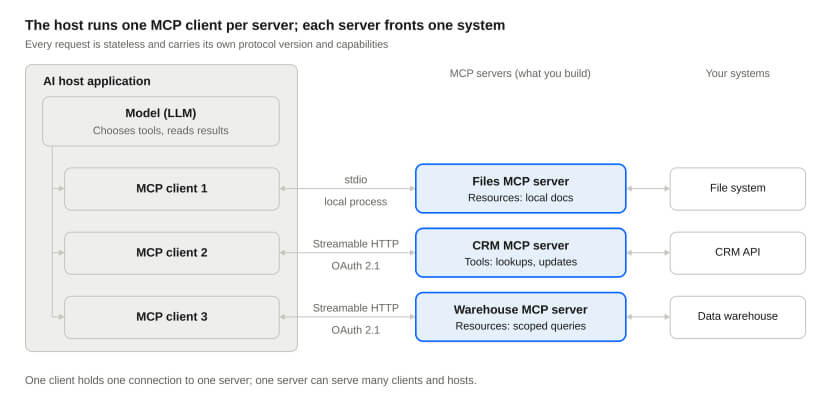
MCP server architecture · host, clients, servers, systems
The model never talks to your systems directly. It asks for a tool, the matching client forwards the request, and the server decides whether and how to run it.
All messages use JSON-RPC 2.0, carried over one of two transports:
- stdio runs the server as a local process and exchanges messages over standard input and output. It suits developer tools and desktop assistants.
- Streamable HTTP runs the server as a remote web service with standard HTTP authorization. It suits shared, multi-user, and production deployments.
How a Single Request Flows
- The user asks the agent to do something, such as “summarize open renewals for Acme.”
- The model reviews the tools each server lists through tools/list and picks the right one.
- The client sends a tools/call request that carries its protocol version and capabilities in _meta.
- The server validates the input, checks authorization, and calls the underlying system.
- The server returns a result marked complete, or input_required if it needs more from the user, and the model uses it to answer.
What Changed in the 2026-07-28 Specification
The 2026-07-28 revision is the largest since launch, and it changes how MCP servers run in production:
- Stateless by default. The initialize handshake and protocol-level sessions are gone, so any server instance behind a load balancer can answer any request.
- Mandatory discovery. Servers must implement server/discover to advertise supported versions, capabilities, and identity.
- Multi-round-trip requests. Servers that need extra input return an input_required result instead of initiating their own requests to the client.
- One subscription stream. subscriptions/listen replaces the old resource subscribe and unsubscribe methods.
- Deprecations. Roots, Sampling, Logging, and the legacy HTTP+SSE transport are now deprecated, with at least a 12-month window before removal.
If you built an MCP server on the 2025 specs, plan a migration rather than a version bump. Most changes simplify operations, but session-dependent logic will need a redesign.
The Three Building Blocks of an MCP Server
Every MCP server offers some mix of three primitives: tools, resources, and prompts. The key difference is who decides when to use them.
| Primitive | What it does | Who controls it | Enterprise example |
|---|---|---|---|
| Tools | Executable functions with typed inputs and outputs, defined in JSON Schema | The model | Create a refund in the billing system |
| Resources | Read-only context identified by a URI, such as files, schemas, or records | The application | Load a customer’s last 10 support tickets |
| Prompts | Parameterized templates that package a repeatable workflow | The user | /quarterly-account-review for a named client |
Tools are where agents earn their keep, and where most of the risk sits. A tool can write to a database, call an external API, or trigger a workflow. Good tool design means one clear operation per tool, a tight input schema, and a description the model can’t misread.
Resources give the AI application grounded context without letting the model take action. Each resource has a URI and a MIME type, and resource templates such as crm://accounts/{id}/history let clients request exactly the data slice they need. If your data lives across warehouses and lakes, the same modeling discipline used in a well-architected data warehouse makes resources far easier to expose cleanly.
Prompts turn tribal knowledge into reusable commands. A finance team’s month-end checklist or a support team’s escalation script becomes a slash command that pulls in the right tools and resources every time.
MCP Client vs Server: What’s the Difference?
An MCP client consumes capabilities; an MCP server provides them. The client lives inside the AI application and speaks for the model. The server sits in front of a system and speaks for that system.
| MCP client | MCP server | |
|---|---|---|
| Lives in | The host application (an AI assistant, IDE, or agent runtime) | Its own process, local or remote |
| Main job | Discovers capabilities, routes model requests, returns results | Exposes tools, resources, and prompts for one system |
| Relationship | One client per connected server | Can serve many clients at once |
| Owned by | The AI application vendor or your agent platform team | The team that owns the underlying system or API |
| Security focus | User consent, approval prompts, token storage | Authorization, input validation, least-privilege access |
| Example | The connector layer inside Claude, ChatGPT, or VS Code | A Postgres, Jira, or internal pricing-API server |
The practical takeaway: most enterprises will build servers, not clients. The major AI platforms already ship MCP clients, so the high-value work is wrapping your own systems so any of those clients can use them safely.
How to Deploy an MCP Server: A Step-by-Step Guide
Deploying an MCP server in production takes eight steps, from scoping to governance. The 2026-07-28 spec makes several of them simpler, because servers no longer hold sessions and can scale like any other web service.
- Scope it to one system and a few jobs: Start with the three to five actions your agents actually need, such as “look up an order” or “draft a renewal quote.” A narrow server is easier to secure, test, and explain to the model.
- Choose the transport: Use stdio when the server runs on the same machine as the client, such as a developer’s IDE. Use Streamable HTTP for remote, shared, or multi-tenant servers. The older HTTP+SSE transport is formally deprecated, so new builds should skip it.
- Build with an official SDK: The Python and TypeScript SDKs handle JSON-RPC framing, schema validation, and the new server/discover method that every server must now implement. Define each tool with a precise JSON Schema and a description written for the model, not for humans skimming docs:
{
“name”: “get_order_status”,
“description”: “Return shipping status for one order by order ID. Read-only.”,
“inputSchema”: {
“type”: “object”,
“properties”: { “order_id”: { “type”: “string”, “pattern”: “^ORD-[0-9]{8}$” } },
“required”: [“order_id”]
}
}
- Design for statelessness: The current spec removed the initialize handshake and the Mcp-Session-Id header, so every request carries its own protocol version and capabilities. Put the server behind a standard load balancer. If a workflow needs state across calls, mint an explicit handle and pass it as a normal tool argument.
- Add authorization before anything else ships: Remote servers act as OAuth resource servers. Integrate with your identity provider, prefer Client ID Metadata Documents over Dynamic Client Registration, and scope tokens to the minimum each tool needs. Treat agents as first-class identities, following the same principles used for governing non-human identities across agent fleets.
- Containerize and deploy: Package the server as a container and run it on Kubernetes, a serverless platform, or behind an API gateway. Stateless servers autoscale cleanly, which is why a solid cloud foundation and DevOps practice pays off quickly here.
- Instrument everything: The spec now documents OpenTelemetry trace propagation through _meta, so you can trace a request from the user’s prompt through the agent to the downstream system. Log every tool call with its arguments, caller identity, and result.
- Test, evaluate, and govern: Use the MCP Inspector to exercise tools by hand, then run scenario-based tests that check whether the model picks the right tool with the right arguments. Fold this into a broader AI agent evaluation approach covering accuracy and reliability, and publish approved servers to an internal registry with clear owners and version policies.
One pattern is worth calling out. Many enterprises use MCP servers as a thin, governed layer over older systems, which lets agents reach mainframe or ERP data during a phased legacy modernization program without a risky big-bang rewrite.
MCP Server Security: Risks and Controls
MCP server security comes down to one fact: anything a server sends back, including tool descriptions, lands in the model’s context and can shape its behavior. That makes an MCP server both an access point to your systems and a potential channel for manipulating the agent.
| Risk | How it happens | Control |
|---|---|---|
| Tool poisoning | A tool’s description hides instructions the model treats as trusted | Review and pin tool definitions; allow only vetted servers |
| Indirect prompt injection | A document, email, or ticket returned as a resource contains malicious instructions | Treat all returned content as data; require approval for sensitive follow-up actions |
| Over-permissioned tokens | One broad credential lets any tool touch any record | Scope tokens per tool and per user; enforce least privilege server-side |
| Token passthrough | A server forwards the client’s token to downstream APIs it wasn’t issued for | Validate audience on every token; exchange for downstream credentials instead |
| Silent definition changes | A server changes what a tool does after it was approved | Version tool definitions and alert on any change |
| Unvetted community servers | A public server ships with vulnerabilities or excessive scopes | Run an internal registry; scan, sandbox, and own every server you deploy |
| Cross-server data leakage | Data from one server flows into a tool call on another | Segment sensitive servers; apply data-loss rules at the gateway |
The 2026-07-28 spec tightened several authorization rules. Clients must now validate the issuer in authorization responses and bind stored credentials to the authorization server that issued them. Those changes close real gaps, but the protocol can’t enforce your business rules. Your server still has to check that this user, through this agent, is allowed to perform this action on this record.
Human oversight belongs in the design, too. High-impact tools, such as payments, deletions, or external emails, should require explicit approval in the client. Running agents with these guardrails, audit trails, and kill switches is the core of AgentOps as a production discipline, and MCP servers are where many of those controls physically live.
Where MCP Servers Deliver Enterprise Value
MCP servers pay off fastest where agents need live data from several systems to finish one task. A few patterns we see repeatedly:
- Customer operations. One agent reads CRM history, checks order status, and drafts a resolution, pulling from three MCP servers instead of three custom integrations.
- Engineering productivity. IDE assistants connect to repositories, CI pipelines, and incident tools, which supports the shift toward AI-native engineering, where AI sits at the core of how software gets built.
- Analytics on demand. A governed warehouse MCP server lets business users ask questions in plain English while queries stay read-only and row-level security stays intact.
- Regulated industries. In healthcare, servers can expose only de-identified or role-scoped clinical data. In retail and CPG, they connect agents to inventory, pricing, and promotions without opening the whole ERP.
Building the server is rarely the hard part. The hard part is deciding which capabilities to expose, modeling the data underneath, and wiring in identity, observability, and approvals so the result passes a security review. That’s the work our enterprise AI services team does with clients, alongside the data and ML engineering that keeps the data behind each server clean and trustworthy.
How [x]cube LABS Can Help
[x]cube LABS helps enterprises take MCP from a promising prototype to governed production infrastructure. We cover the full path, from choosing which systems to expose to running the servers once your agents depend on them.
- MCP readiness assessment: We map your systems, data, and agent use cases to pinpoint the MCP servers worth building first, and the ones that should wait.
- Server design and build: Our enterprise AI services team designs tool schemas, resource models, and prompts that models use correctly, built on the current 2026-07-28 specification.
- Data foundations: Through data and ML engineering, we clean, model, and secure the data behind each server so agents get accurate, permission-aware answers.
- Security and governance: We connect MCP servers to your identity provider, enforce least-privilege scopes, add human approval for high-impact tools, and set up an internal server registry.
- Cloud deployment: Our cloud services team containerizes and deploys stateless servers with autoscaling, OpenTelemetry tracing, and CI/CD on the cloud you already use.
- Ongoing operations: With Live-Ops as a Service, we monitor, evaluate, and update servers and agents after launch as specs, models, and business rules change.
Already running MCP servers built on 2025 specs? We also migrate them to the stateless 2026-07-28 revision without disrupting the agents that rely on them. Explore our portfolio to see the enterprise platforms our teams have shipped.
Frequently Asked Questions
1) What is an MCP server in simple terms?
An MCP server is an adapter that lets AI applications use a specific system, such as a database, SaaS tool, or internal API. It describes what the AI can do and read in a standard format, so any MCP-compatible assistant can use it without custom code.
2) Is MCP the same as an API?
No. An API exposes a system to developers who write code against it. An MCP server usually sits on top of one or more APIs and describes them in a way an AI model can discover and call on its own, with schemas, descriptions, and permissions built in.
3) What is the difference between an MCP client and an MCP server?
The MCP client lives inside the AI application and makes requests on the model’s behalf. The MCP server sits in front of a system and answers those requests by running tools, returning resources, or providing prompts.
4) Which transport should an MCP server use?
Use stdio for local servers running on the same machine as the client. Use Streamable HTTP for remote or shared servers. The legacy HTTP+SSE transport is deprecated and shouldn’t be used in new builds.
5) Is it safe to use community MCP servers in an enterprise?
Only after review. Treat community servers like any third-party dependency: scan the code, pin versions, restrict scopes, and run them through an internal registry. Many enterprises rebuild critical servers in-house for full control.
6) Do MCP servers work with models other than Claude?
Yes. MCP is model-agnostic and governed by the Agentic AI Foundation under the Linux Foundation. ChatGPT, Gemini, Microsoft Copilot, Cursor, and Visual Studio Code all support MCP clients.
Conclusion: Treat Your MCP Servers as Infrastructure
An MCP server turns a system into something any AI agent can use, through one open, vendor-neutral standard. Get the scope, transport, authorization, and observability right, and each new server compounds the value of every agent you deploy. Get them wrong, and you’ve built a fast lane for prompt injection into your core systems.
The teams pulling ahead treat MCP servers the way they treat APIs: owned, versioned, monitored, and reviewed. If you’re mapping out where MCP fits in your stack, talk to the [x]cube LABS team about designing and deploying MCP servers your security and data teams can stand behind.