In a legacy systems report, the U.S. Government Accountability Office reviewed 69 critical federal systems and ranked the 11 most in need of modernization. They range from 23 to 60 years old; eight run on outdated programming languages; and seven have known cybersecurity vulnerabilities. Only three have modernization plans with milestones, a description of the work, and a plan to retire the old system.
Private enterprises face the same bind: the systems most in need of change are the ones the business can least afford to interrupt. This guide covers how to choose a legacy modernization approach for each system, keep core operations running while you change them, and decide where mainframes, microservices, and AI belong in the plan.
What Is Legacy Modernization?
Legacy modernization is the work of changing a business-critical system’s code, architecture, platform, or data so it meets current demands for speed, security, cost, and integration, while the business keeps running on it. The last clause is the hard part. A system you can switch off for a quarter is a rebuild project; a system that settles payments every night is a modernization project.
Three terms get used interchangeably, but they describe different scopes:
| Term | Scope | Example |
| Legacy application modernization | One application or a tightly related set: its code, structure, interfaces, and APIs | Breaking a claims-processing application into services behind an API layer |
| Legacy system modernization | The application plus everything around it: infrastructure, databases, batch jobs, file transfers, monitoring, and operations | Moving a policy administration system, its database, nightly batch, and partner file feeds to a hybrid cloud |
| Mainframe modernization | Workloads on mainframe platforms, typically COBOL or PL/I programs, CICS or IMS transactions, DB2 data, and JCL batch | Exposing CICS transactions as APIs, then moving reporting workloads to a cloud data platform |
Modernization is a portfolio decision, and the answer differs system by system. Most enterprises run core workloads across mainframe, on-premises, private cloud, and public cloud environments and will keep doing so for years, so the goal is a set of systems that can each change safely wherever they run.
Six Signs a Core System Needs Modernizing
Age alone is a poor trigger. Plenty of 30-year-old code runs reliably. Modernize when a system starts to constrain the business, and collect evidence before you decide:
| Signal | What it looks like | Evidence to collect |
| Change is slow and risky | Releases are quarterly, every release needs a freeze, and regressions are common | Release frequency, change failure rate, manual regression test hours |
| Knowledge sits with a few people | Two or three engineers can safely change the code, and they are near retirement or overloaded | Number of people who can ship a change unaided; share of modules with current documentation |
| Every integration is custom | New partners and channels connect through file drops, screen scraping, or point-to-point scripts | Share of integrations served through APIs; weeks to onboard a new integration |
| Data is trapped | Analytics and AI teams wait on nightly extracts or manual pulls | Data latency into analytics; number of copies of the same record |
| Security and compliance exposure | Unsupported runtimes, operating systems, or libraries; audit findings that repeat | Count of components past vendor support; open audit findings |
| AI cannot reach it | AI pilots stall because the system has no APIs, no event stream, and no usable documentation | Pilots blocked by system access; time to expose a new data feed |
The skills signal is the one that gets worse without warning. GAO’s 2025 review notes that both Treasury systems on its list run on COBOL and Assembly, languages with a dwindling pool of people who can support them. Count how many people can safely change each core system today, and check how many will still be there in three years.
The data signal is what blocks AI. If getting a new feed out of a core system takes months, the pipeline constrains us as much as the application; our guide to data engineering services covers the ownership and tooling that shorten that path.
Delay has its own cost. GAO named the 10 most critical federal legacy systems in 2019; as of February 2025, only three of those modernizations were complete. It warned that until plans are fully documented, modernization efforts are more likely to face cost overruns, schedule delays, and outright failure, while the old systems grow more vulnerable.
Seven Legacy Modernization Approaches, Ranked by Disruption Risk
Most guides list these approaches as equal options. They are not equal in what they put at risk. The table orders them by how much of the running system each one touches.
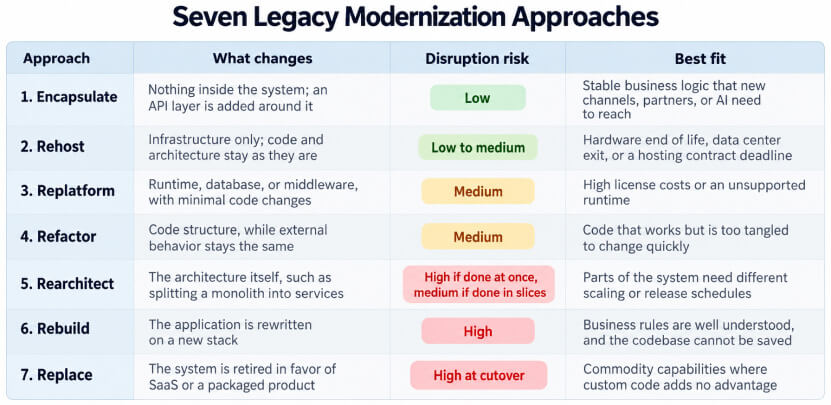
An eighth option belongs on every assessment: retire. Portfolio reviews regularly surface applications nobody uses, or that duplicate another system, and switching them off is the cheapest modernization there is.
The decision rule is simple: pick the lowest-disruption approach that removes the constraint you measured. If the constraint is integration, encapsulate. If it is hardware or license cost, rehost or replatform. If it is the speed of change, refactor or rearchitect the modules that change most often, and leave stable modules alone. Rebuild and replace only when the cheaper options cannot remove the constraint.
One system often gets more than one approach over time. A common sequence is to encapsulate first so new work stops landing in legacy code, then rehost to cut infrastructure costs, then rearchitect the high-change modules. If the workload is moving to the cloud, the cloud migration strategies guide covers the infrastructure side of each option.
Mainframe Modernization: Three Paths and How to Choose
Mainframe modernization rarely means leaving the mainframe outright. Many organizations keep high-volume transaction processing on the platform and change what surrounds it. Teams choose among three paths, often for different workloads in the same estate:
- Modernize in place. Keep workloads on the platform and update how teams work with them: API access to CICS and IMS transactions, modern source control and CI/CD pipelines, automated testing, and current z/OS tooling.
- Integrate with cloud. Keep the transactional core on the mainframe and move the work around it: analytics, reporting, digital front ends, and AI services run in the cloud and connect through APIs and replicated data.
- Move workloads off. Convert or rewrite programs and migrate them to cloud or distributed platforms, usually starting with batch and reporting jobs before online transactions.
The right path depends on the workload, so classify each one by two questions. How often does the business need to change it? How tightly is it coupled to the nightly batch and to other programs? High-volume, rarely changed transaction processing is often best left in place and wrapped in APIs. Reporting, analytics, and customer-facing logic that changes every month are the usual first candidates to move.
Data is the fastest win on any of the three paths. Change data capture can stream DB2 or VSAM updates into a cloud data platform in near real time, which ends the wait for nightly extracts without touching the programs that write the data. Our explainer on data lakehouse architecture covers one common target for that data.
Two constraints shape every mainframe plan. The first is regulation: in financial services, healthcare, and government, compliance and data residency rules often decide which workloads can move and where, which is why many organizations keep selected applications on the platform. The second is AI. The systems of record that AI agents need to read and act on often live on the mainframe, and Gartner’s forecast for AI agents in enterprise apps expects 40% of enterprise applications to include task-specific AI agents by the end of 2026, up from less than 5% in 2025. Those agents will need governed API access to mainframe data and transactions.
Monolith to Microservices: When to Split and When to Wait
Splitting a monolith pays off when different parts of the system need to change, scale, or fail independently. It costs more than teams expect: every service needs its own deployment pipeline, monitoring, data ownership, and on-call rotation. Check the signals before committing.
| Split when | Wait when |
| Several teams block each other on the same release | One team owns the system and ships without waiting on others |
| One module needs far more capacity than the rest | Load is even across the system |
| A failure in one area takes down unrelated functions | Failures are rare and well contained |
| Parts of the domain change weekly while others have not changed in years | The whole system changes at a similar pace |
When the wait column describes you, a modular monolith gets most of the benefit at a fraction of the operating cost. Draw clear internal boundaries, give each module its own data access layer, and enforce those boundaries in code review. If you later need to split, the seams are already in place.
When you do split, do it in slices with the strangler fig pattern:
- Put a routing layer, usually an API gateway or proxy, in front of the monolith so every request passes through a point you control.
- Pick one business capability with a high rate of change and few dependencies, such as notifications, pricing rules, or document generation.
- Build that capability as a service, and route a small share of its traffic to the new service while the monolith keeps handling the rest.
- Widen the traffic share as error rates and response times hold steady, then delete the old code path.
- Repeat with the next capability.
The database is where most splits stall. Two services writing to the same tables keep them coupled, no matter how you split the code. Give each extracted service ownership of its data, and use change data capture or the outbox pattern to keep the monolith’s tables in sync until every reader has moved.
How to Modernize Core Systems Without Disruption
Disruption comes from three places: a cutover that cannot be reversed, behavior that changes without anyone noticing, and data that drifts between the old and new systems. Each pattern below controls one of those risks. Most programs need all of them.
| Pattern | How it works | Risk it controls |
| Characterization tests | Record what the legacy system does today for a wide set of inputs, then run those tests against every change | Behavior changes that no one specified or noticed |
| Routing facade | A gateway decides, request by request, whether the old system or the new one responds | A single high-stakes cutover |
| Anti-corruption layer | A translation layer between old and new models, so new services do not inherit legacy data structures | Legacy design leaking into new code |
| Change data capture | Every write to the legacy database is streamed to the new data store in near real time | Data drift between the two systems |
| Shadow traffic | The new component receives a copy of live production traffic, and its responses are compared, then discarded | Performance and correctness surprises at launch |
| Parallel run | Old and new systems process the same real transactions for a full business cycle, and outputs are reconciled before the switch | Silent differences in calculations, especially month-end and year-end logic |
| Canary release with rollback | Traffic moves in small steps, and the old path stays warm until the new one has run cleanly through a full cycle | A failure reaching every customer at once |
Start with characterization tests. Legacy systems rarely have specifications that match what the code does, and the tests become that specification. They also tell you, for every later change, whether you broke something the business relies on.
Set the parallel run period by the business calendar. A payments engine that runs cleanly for a week has not yet seen month-end close, interest accrual, or a holiday schedule. Run through at least one full cycle of whatever matters most to the business before you retire the old path.
Define rollback before cutover. Write down the trigger conditions, who decides, how long a rollback takes, and how records created on the new system get reconciled if you go back. A rollback plan that has never been rehearsed is a hope, so test it in a lower environment first.
How AI Changes Legacy Modernization
AI is most useful on the work that used to stall programs before a line of code changed: understanding what the legacy system does. That knowledge gap is often the binding constraint. In GAO’s 2025 review, 8 of the 11 most critical federal systems use outdated programming languages, and the people who can read those languages are getting harder to find.
Where AI earns its place today:
- Code comprehension. Explaining what a COBOL program, stored procedure, or undocumented service does, in plain language, for the engineers who have to change it.
- Dependency mapping. Tracing calls, shared tables, batch job chains, and file flows across thousands of programs, often the slowest step in discovery.
- Test generation. Drafting characterization tests from observed inputs and outputs, so the safety net exists before refactoring starts.
- Code conversion drafts. Producing a first version of converted code that engineers then review, test, and correct.
- Documentation. Producing and maintaining documentation for systems that have none.
Treat AI-converted code like code from a new contractor: useful, fast, and unverified. Converted code can compile, pass unit tests, and still handle rounding, date logic, or packed decimal fields differently than the original. The parallel runs and characterization tests described above are what catch those differences. Gartner’s June 2025 research note makes a related point: generative AI will not end legacy IT, and vendor claims about eliminating technical debt have inflated stakeholder expectations.
Agents that read source code and touch build pipelines also need the same controls as any other privileged user. Give each agent its own credentials and the narrowest access it needs; our guide to identity and access management for AI agents covers the setup, and the AgentOps discipline covers monitoring them once they run. If you are deciding how ready your organization is to run AI at this level, our AI maturity model gives a way to score it.
Metrics That Show Modernization Is Working
Capture a baseline before the first change, then track the same measures through every slice. Without a baseline, every claim of improvement turns into an argument.
| Metric | What it tells you |
| Deployment frequency and lead time for changes | Whether the system is getting easier to change |
| Change failure rate and time to restore service | Whether faster change is coming at the cost of stability |
| Severe incidents caused by migration work | Whether the no-disruption patterns are holding; the target is zero |
| Run cost per transaction | Whether infrastructure and license savings are real |
| Share of integrations served through APIs | Whether new channels, partners, and AI can reach the system |
| Legacy components decommissioned | Whether old code, servers, and licenses are being switched off |
| People able to ship a change unaided | Whether knowledge risk is shrinking |
The decommissioning metric is the one programs forget. Savings arrive only when you switch off the old system, cancel its licenses, and return its servers. A program that builds new services but never retires old ones ends up running both, at higher cost than before.
Operations deserve their own attention after each cutover, when new services, the routing layer, and remaining legacy components are all live at once. Teams using agentic AIOps apply agents to incident triage across that mixed estate.
A Five-Phase Legacy Modernization Roadmap
Each phase ends with a gate. Moving past a gate before the evidence exists leaves programs with half-built services, a legacy system still in charge, and two sets of costs.
| Phase | Work | Gate to the next phase |
| 1. Map | Inventory applications, owners, data flows, batch chains, and integrations. Use AI-assisted analysis to trace dependencies and document undocumented code. Tag each system with one approach from the table above. | Dependency map reviewed and confirmed by system owners; every system tagged |
| 2. Protect | Write characterization tests for critical paths, capture baseline metrics, add monitoring, and put a routing facade in front of the first target system. | Critical paths covered by tests; baseline recorded; facade live with no behavior change |
| 3. Prove | Modernize one slice with clear business value and few dependencies. Use shadow traffic, a parallel run, and a canary release. | Slice in production with no severe incidents; rollback rehearsed; old code path deleted |
| 4. Scale | Repeat the pattern slice by slice. Turn the facade, pipelines, test tooling, and data sync into a shared platform the next teams reuse. | Each new slice reaches production faster than the one before |
| 5. Retire | Decommission legacy components, cancel licenses, archive data to meet retention rules, and return infrastructure. | Old system switched off and its costs removed from the budget |
Phases 4 and 5 overlap in practice: retire each legacy component as soon as its last reader moves, instead of waiting for a final big switch-off.
The skill mix shifts across the phases. Mapping and protection lean on people who know the legacy system. Scaling leans on platform, data, and DevOps engineers, and many programs bring in a data and ML engineering team so they build data pipelines once and reuse them across slices. Once core systems can change safely, the next design question is how far to go toward an AI-native architecture, where new services are designed from the start around AI decisions.
Conclusion: Modernize in Slices You Can Reverse
Legacy modernization without disruption comes down to three habits. Map dependencies before changing anything. Pick the lowest-disruption approach that removes the constraint you measured. Move work in slices you can shadow, run in parallel, and roll back.
GAO’s 2025 findings name the three elements every modernization plan needs: milestones, a clear description of the work, and a plan for disposing of the legacy system. They apply equally to a bank’s core platform and a federal agency’s. The last one, retiring the old system, is where the savings come from, so put it in the plan from day one.
Frequently Asked Questions
What is legacy modernization?
Legacy modernization is the process of updating a business-critical system’s code, architecture, platform, or data so it meets current needs for speed, security, cost, and integration, while the business keeps running.
What is the difference between legacy application modernization and legacy system modernization?
Legacy application modernization focuses on the application itself: its code, structure, and interfaces. Legacy system modernization covers the application plus its infrastructure, databases, batch jobs, integrations, and operations. Most programs that start as application work become system work once you map data and integrations.
How do you modernize a legacy system without downtime?
Put a routing facade in front of the system, protect current behavior with characterization tests, keep data in sync with change data capture, and move functionality in slices. Validate each slice with shadow traffic and a parallel run, release it gradually, and keep the old path available until the new one has run through a full business cycle.
Does mainframe modernization mean leaving the mainframe?
Usually not. Many organizations modernize in place or integrate the mainframe with cloud services, keeping high-volume transaction processing on the platform. Moving workloads off is one of three paths, and it is most common for batch, reporting, and frequently changed logic.
When should you not move a monolith to microservices?
When one team owns the system, releases are not blocked by other teams, and load and failures are evenly spread. In that case, a modular monolith with enforced internal boundaries delivers most of the benefit at a lower operating cost.
How long does legacy modernization take?
A full program for a core system often runs for years, but each slice should reach production on a timeline the business can track. If a slice hasn’t reached production within a few months, it is usually too large or too entangled, and you should split it again.
Why Choose [x]cube LABS?
[x]cube LABS works with enterprise teams to design and deploy AI agents across complex, regulated environments.
We help enterprises become AI-native, not by adding AI on top of existing systems, but by rebuilding the intelligence layer from the ground up. With 950+ products shipped and $5B+ in value created for clients across 15+ industries, here is what we bring to the table:
1. Autonomous AI Agents
We design and deploy agentic AI systems that sense, decide, and act without human bottlenecks, handling complex, multi-step workflows end-to-end with measurable resolution rates and no manual intervention.
2. Enterprise Voice AI
Our voice AI platform, Ello, puts production-ready voice agents in front of your customers in minutes. Zero-latency conversations across 30+ languages, with no call centers and no wait times.
3. AI-Powered Process Automation
We replace manual, error-prone workflows with intelligent automation across invoicing, compliance, customer service, and operations, freeing your teams to focus on work that requires human judgment.
4. Predictive Intelligence and Decision Support
Using machine learning and real-time data pipelines, we build systems that forecast demand, flag risk, optimize inventory, and surface strategic insights before your teams need to ask for them.
5. Connected Products and IoT
We design and build IoT platforms that turn physical devices into intelligent, connected systems with built-in real-time monitoring, remote management, and condition-based automation.
6. Data Engineering and AI Infrastructure
From data lakes and ETL pipelines to AI-ready cloud architecture, we build the foundation that makes everything else possible, scalable, reliable, and designed to grow with your business.
If you are looking to move from AI experimentation to AI-native operations, let’s talk