
Kubernetes Networking
Kubernetes networking is an essential aspect of Kubernetes architecture and enables communication between the various components of a Kubernetes cluster. It provides a way for containers running on different nodes to communicate, for services to discover and communicate with each other, and for external traffic to be routed to services running within the cluster.
Kubernetes networking provides a highly scalable and reliable network infrastructure that enables the communication between pods, services, and external traffic in your product engineering efforts.
This blog will discuss how to configure services and ingress in Kubernetes.
What is Kubernetes?
Kubernetes is an open-source container orchestration platform designed to automate containerized applications’ deployment, scaling, and management.
It lets developers package their applications and dependencies into containers, which can be easily deployed and run on any Kubernetes-compatible infrastructure.
Kubernetes Services
A Kubernetes service can be defined as a group of pods. It is an abstraction on top of the pod that provides a stable IP address and DNS name for pod access.
It helps pods scale significantly, and the load balancer is easy. It allows clients to access the pods without knowing their IP addresses. Services can be defined in Kubernetes using the YAML or JSON format.
To create a service in Kubernetes, you need to define the following fields:
- apiVersion: This specifies the Kubernetes API version. The current version is v1.
- Kind: This specifies the resource type. For a service, the style is Service.
- Metadata: This field contains metadata about the Service, such as names, labels, and annotations.
- Spec: This field defines the specifications for the Service, such as the type of Service, selector, and port mappings.
Example of configuring a service:
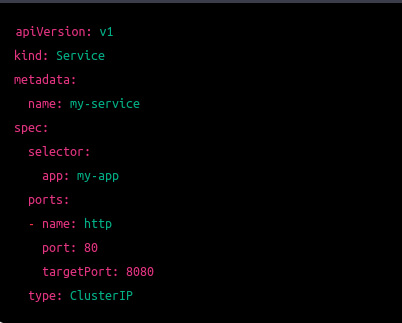
In this example, we are creating a service named my-service that will route traffic to pods labeled with the app my-app. The Service exposes port 80 and routes traffic to container port 8080.
Service Types
Kubernetes supports four types of services:
- ClusterIP: This is the default service type. It provides a stable IP address and DNS name for capsules within the cluster. This type of service is used to maintain internal communication between capsules. This type of service is used to communicate internally between pods.
- NodePort: This type of service exposes the service to a port on each node in the cluster. It provides a way to access the Service outside the group using the node’s IP address and the NodePort.
- LoadBalancer: This type of service provides a load balancer. It is typically used in cloud environments where a cloud provider can provision a load balancer automatically.
- ExternalName: This type of Service maps the Service to a DNS name. It is used to connect to external services that are not running in the cluster.
Service Discovery
Kubernetes provides built-in service discovery using DNS. Based on the service name and namespace, each service is assigned a DNS name, which clients can use to access the Service.
Kubernetes Ingress
Ingress is a Kubernetes resource that routes traffic from external sources to applications running in the Kubernetes cluster. Using ingress, we can maintain the DNS routing configurations. The ingress controller does the routing by reading the routing rules from the ingress resource.
We must understand the two concepts here:
- Kubernetes Ingress Resource: Kubernetes ingress resource stores DNS routing rules in the cluster.
- Kubernetes Ingress Controller: Kubernetes ingress controllers (Nginx) are responsible for routing by accessing the DNS rules applied through ingress resources.
We can map the external DNS traffic to the internal Kubernetes service endpoints. This requires an ingress controller to route the rules specified in the ingress object.
Example of creating an Ingress:
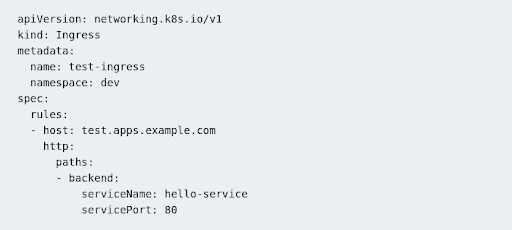
The above declaration means that all calls to test.apps.example.com should hit the Service named hello-service residing in the dev namespace.
Conclusion:
In Kubernetes, services and ingress allow you to expose and route traffic to your application running in containers.